
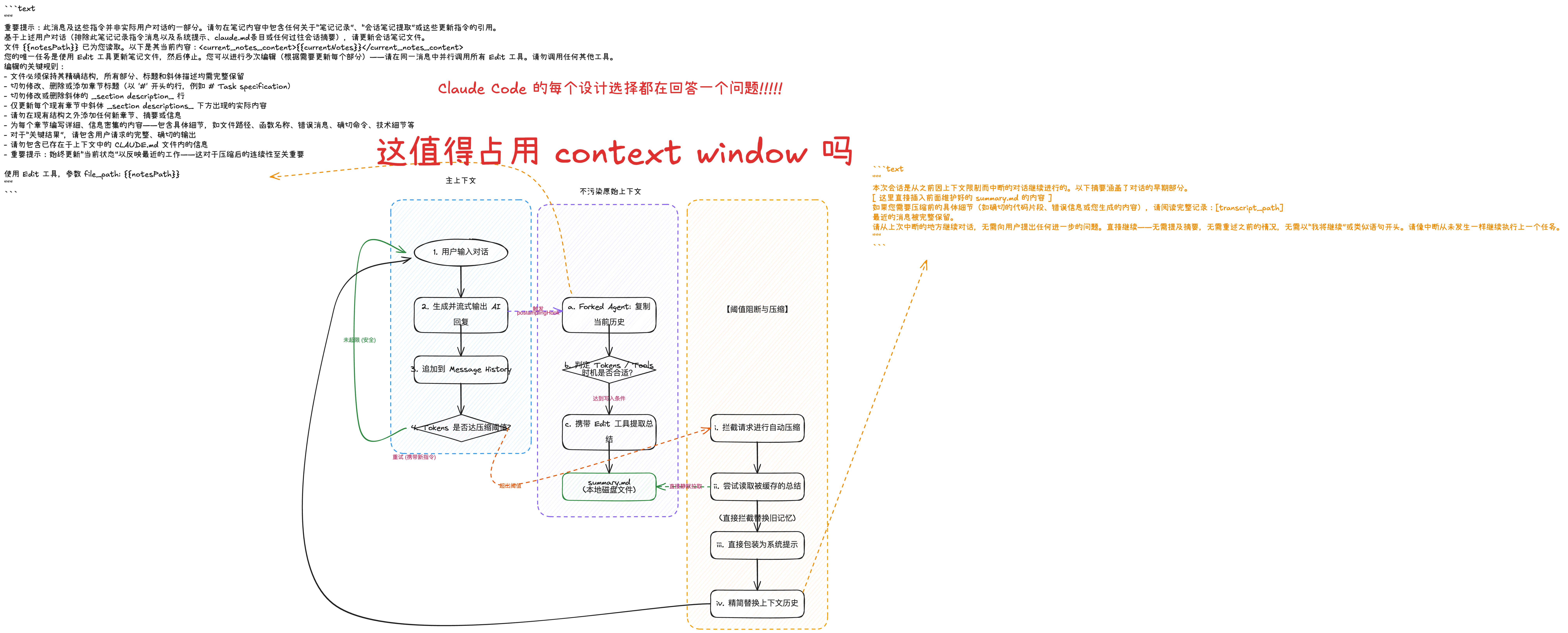
基于源码,Claude Code 对于 “Session Memory 驱动的上下文压缩” 并非在触发压缩的那一刻才去用 Prompt 问大模型“请帮我总结一下”。
实际上,它分成了两步:第一步是后台 Sub-agent 不断维护 summary.md 用的 Prompt;第二步是触发压缩时,直接把 summary.md 包裹进一段“场景说明 Prompt” 塞进对话流。
以下是源码中对应的具体提示词(Prompts):
1. 后台 Sub-agent 更新 Session Memory 时的 Prompt
这个 Prompt 被定义在 src/services/SessionMemory/prompts.ts 中。它的核心要求是让 Sub-agent “默默记笔记”,只准修改文件,严禁输出任何废话。
IMPORTANT: This message and these instructions are NOT part of the actual user conversation. Do NOT include any references to "note-taking", "session notes extraction", or these update instructions in the notes content.

Based on the user conversation above (EXCLUDING this note-taking instruction message as well as system prompt, claude.md entries, or any past session summaries), update the session notes file.

The file  has already been read for you. Here are its current contents:
<current_notes_content>

</current_notes_content>

Your ONLY task is to use the Edit tool to update the notes file, then stop. You can make multiple edits (update every section as needed) - make all Edit tool calls in parallel in a single message. Do not call any other tools.

CRITICAL RULES FOR EDITING:
- The file must maintain its exact structure with all sections, headers, and italic descriptions intact
- NEVER modify, delete, or add section headers (the lines starting with '#' like # Task specification)
- NEVER modify or delete the italic _section description_ lines
- ONLY update the actual content that appears BELOW the italic _section descriptions_ within each existing section
- Do NOT add any new sections, summaries, or information outside the existing structure
- Write DETAILED, INFO-DENSE content for each section - include specifics like file paths, function names, error messages, exact commands, technical details, etc.
- For "Key results", include the complete, exact output the user requested
- Do not include information that's already in the CLAUDE.md files included in the context
- IMPORTANT: Always update "Current State" to reflect the most recent work - this is critical for continuity after compaction

Use the Edit tool with file_path:
配套的默认模板 (Template) 会要求小弟从这几个维度做梳理:Session Title,Current State,Task specification,Files and Functions,Workflow,Errors & Corrections,Codebase and System Documentation,Learnings,Key results,Worklog。
中文提示词:
"""
重要提示:此消息及这些指令并非实际用户对话的一部分。请勿在笔记内容中包含任何关于“笔记记录”、“会话笔记提取”或这些更新指令的引用。
基于上述用户对话(排除此笔记记录指令消息以及系统提示、claude.md条目或任何过往会话摘要),请更新会话笔记文件。
文件  已为您读取。以下是其当前内容:<current_notes_content></current_notes_content>
您的唯一任务是使用 Edit 工具更新笔记文件,然后停止。您可以进行多次编辑(根据需要更新每个部分)——请在同一消息中并行调用所有 Edit 工具。请勿调用任何其他工具。
编辑的关键规则:
- 文件必须保持其精确结构,所有部分、标题和斜体描述均需完整保留
- 切勿修改、删除或添加章节标题(以 '#' 开头的行,例如 # Task specification)
- 切勿修改或删除斜体的 _section description_ 行
- 仅更新每个现有章节中斜体 _section descriptions_ 下方出现的实际内容
- 请勿在现有结构之外添加任何新章节、摘要或信息
- 为每个章节编写详细、信息密集的内容——包含具体细节,如文件路径、函数名称、错误消息、确切命令、技术细节等
- 对于“关键结果”,请包含用户请求的完整、确切的输出
- 请勿包含已存在于上下文中的 CLAUDE.md 文件内的信息
- 重要提示:始终更新“当前状态”以反映最近的工作——这对于压缩后的连续性至关重要

使用 Edit 工具,参数 file_path:
"""
2. 压缩发生时,注入给主模型(大哥)的拼接 Prompt
当对话上下文(Context Window)快被填满,触发实质的压缩(Compact)时,系统不会再去调用大模型生成总结。
相反,在 src/services/compact/prompt.ts 中的 getCompactUserSummaryMessage 函数里,它会直接将 summary.md 掏出来,套上一个壳(直接当做 User Message 喂给主模型):
This session is being continued from a previous conversation that ran out of context. The summary below covers the earlier portion of the conversation.

[ 这里直接插入前面维护好的 summary.md 的内容 ]

If you need specific details from before compaction (like exact code snippets, error messages, or content you generated), read the full transcript at: [transcript_path]

Recent messages are preserved verbatim.

Continue the conversation from where it left off without asking the user any further questions. Resume directly — do not acknowledge the summary, do not recap what was happening, do not preface with "I'll continue" or similar. Pick up the last task as if the break never happened.
"""
本次会话是从之前因上下文限制而中断的对话继续进行的。以下摘要涵盖了对话的早期部分。
[ 这里直接插入前面维护好的 summary.md 的内容 ]
如果您需要压缩前的具体细节(如确切的代码片段、错误信息或您生成的内容),请阅读完整记录:[transcript_path]
最近的消息被完整保留。
请从上次中断的地方继续对话,无需向用户提出任何进一步的问题。直接继续——无需提及摘要,无需重述之前的情况,无需以“我将继续”或类似语句开头。请像中断从未发生一样继续执行上一个任务。
"""
总结设计的精妙之处
如果你仔细看这两个 Prompt,这就解释了你前面提出的“备忘录”设计为什么非常巧妙:
- 规避了昂贵的“现场总结”: 常规 AI 项目在触发上下文超长时,会把所有的对话历史丢进一个
Summarize this的 Prompt 里等待慢速响应。而 Claude Code 直接省掉了这一步大开销,因为它在后台早就通过碎片化时间写好了。 - 强制主模型“别废话继续干活”: 在最后的注入词(
Continue the conversation... without asking the user...)里,代码强硬地命令模型“不要说我看到了总结,不要寒暄,直接像从来没断开过一样继续干上一步说的活儿”。让切换体验极其丝滑。
咱们的社群
我一直在AI产品以及AI项目, 现在是两家公司的AI咨询顾问.
平时我会解决很多AI问题, 看大量资料. 这些内容我整理后,形成了一个个解决方案和深度思考, 我都放在了社群里.
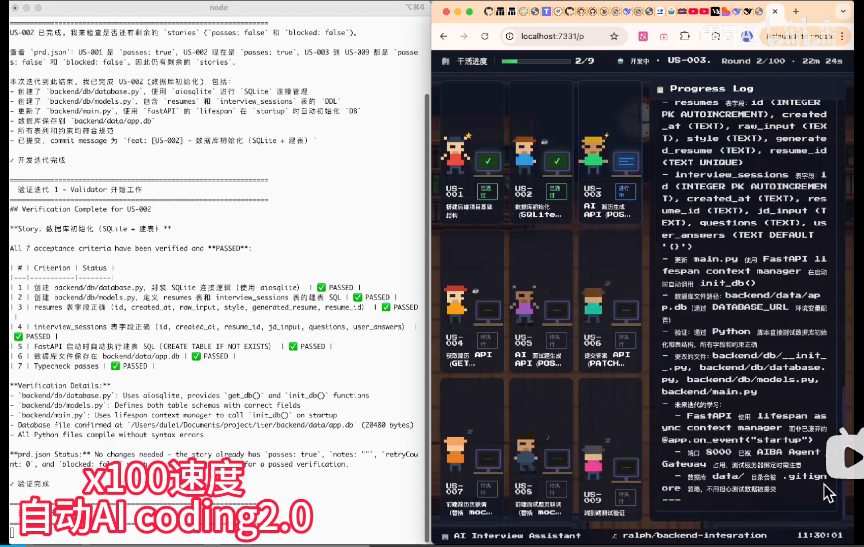
最近比较关注的AI 自动化coding 2.0的系统, 我已经放在社群内部了.
可以晚上不间断执行8小时以上.保证睡眠的同时, 把任务搞定. 哈哈哈
原视频: https://www.bilibili.com/video/BV1Bd9MBxErx/?spm_id_from=333.1387.homepage.video_card.click&vd_source=9e67f3c6b2536721700cabd17dcc4170
已经给26.9kstar的项目提交pr:
提交的PR地址: https://github.com/DayuanJiang/next-ai-draw-io/pull/765
初次之外, 我还沉淀了很多高质量的文章和解决方案:

哈哈, 欢迎一起探索和学习:

我的微信: leigeaicom
AI是百年之未有之大变局, 你我皆在历史中. 一起塑造历史~
加油~ 同仁们.

大家一起来讨论